You’re paying for help.
And still doing the chasing.
Editors. Social media managers. Another monthly invoice. You still brief the work, follow up, and explain what sounds like you.
 TrafficMaxxingOSStart Now ↗
Show up more. Say something worth hearing. Keep running your business.
Feed the machine with your ideas, calls, and videos. TrafficMaxxing OS helps turn them into scripts, edited videos, carousels, and posts—without making you the entire content team.
Founding cohort · $997 for 12 months
Your own paid Claude Code subscription required.
When you have a proven offer, another offer isn’t always the answer. Sometimes you need more traffic: more people seeing a consistent message, more often.
Editors. Social media managers. Another monthly invoice. You still brief the work, follow up, and explain what sounds like you.
Your preferences live in somebody’s head. Your content lives in six apps. You end up rebuilding a workflow you already paid to build.
A blank chat box gives you another job: figuring out the prompts, fixing generic drafts, and moving everything to the next step.
Consistency + volume. More chances for the right people to hear your message. A content system makes showing up easier to repeat.
You bring the experience and the final say. The machine handles the production in between.
Your original voice note. A coaching call. A long-form video. A customer question. Inspiration from saved posts.
Turn the source into ideas, scripts, edited footage, slides, and written drafts. Choose what you want to make and how much.
Record when needed. Review the work, give feedback, and approve what goes out. Keep the useful ideas in rotation.
10–80–10 describes the division of responsibilities, not a measured time-saving guarantee. Your input, recording, and review needs vary.
Bring a specific idea and direct the details. Or feed the machine from your weekly calls and connected folders, with imports and automation configured for your workflow. You set the direction and publishing rules.
One useful call or video can become clips, new scripts, carousels, emails, and social posts. Start small or build a bigger batch. You choose the formats and quantities.
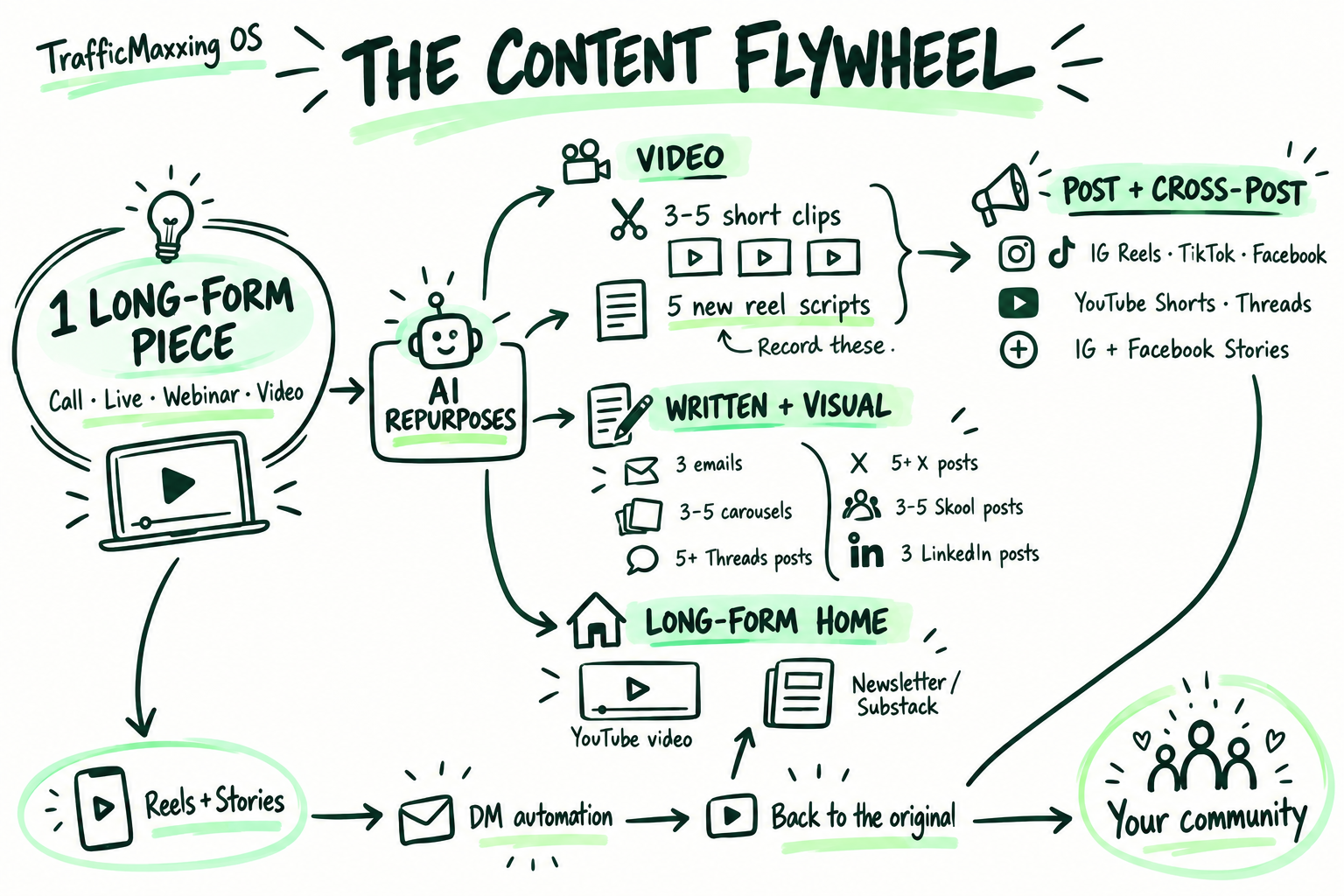
From the idea you almost forgot to the post you finally publish. Here’s what’s inside TrafficMaxxing OS.
Turn raw talking-head footage into a cut with your pacing, captions, and editing preferences. Review it on its content card.
Watch a real before & after ↗Go from a messy idea or a useful rant to hooks, short-form scripts, and longer video outlines you can actually record.
Feed the machine from the work you already do. Bring in calls and transcripts, with automatic imports where connected and enabled.
Use a long video as the source for shorts, scripts, carousels, and written posts. Pull multiple angles from the same expertise.
Choose a carousel look, edit the slides, and make it yours. Use finished designs or take an export through your own Canva workflow.
Try a different hook or revisit an existing reel. Request variations, review the results, and choose what deserves another run.
Give approved content more places to work. Distribute through supported, connected social accounts instead of rebuilding every post.
Choose the destination and supported scheduling options. Use connected publishing or download and post yourself.
Draft emails, LinkedIn posts, Threads, X posts, and community content from the same source and brand context.
See what’s an idea, what needs recording, what’s being edited, and what’s ready for review. Keep feedback with the work.
Save your voice, audience, examples, and preferences. Give the next request—and the next person helping you—a better starting point.
Keep useful ideas and finished content. Log results, find work worth revisiting, and feed what you learn into the next batch.
Connections need setup. Supported publishing uses services such as Blotato, which may cost extra; emails and community posts can be copied to your own tools. Screens show Steph’s workspace; the newest features are rolling out across founding workspaces.
Record like a human. Let the machine help with the edit.
The restarts, pauses, and rough edges don’t have to become your evening. Feed the machine your raw footage and editing preferences. Review the cut, leave a note, and keep moving.
Real before-and-after from Steph’s original machine page. This example shows one edit; results depend on your footage and instructions.
Real screenshots from Steph’s workspace. Feed a source in Studio, move the work through the Board, and choose a look for your carousels.
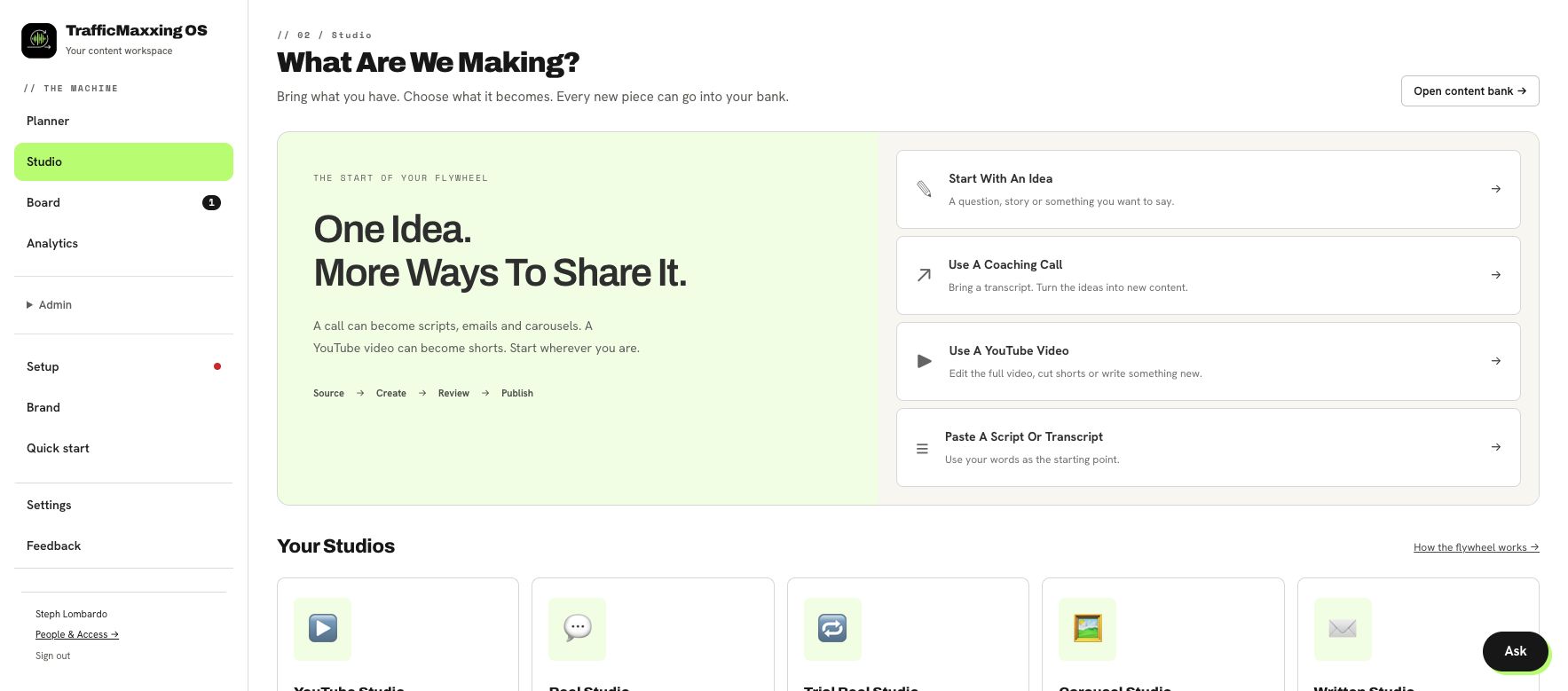
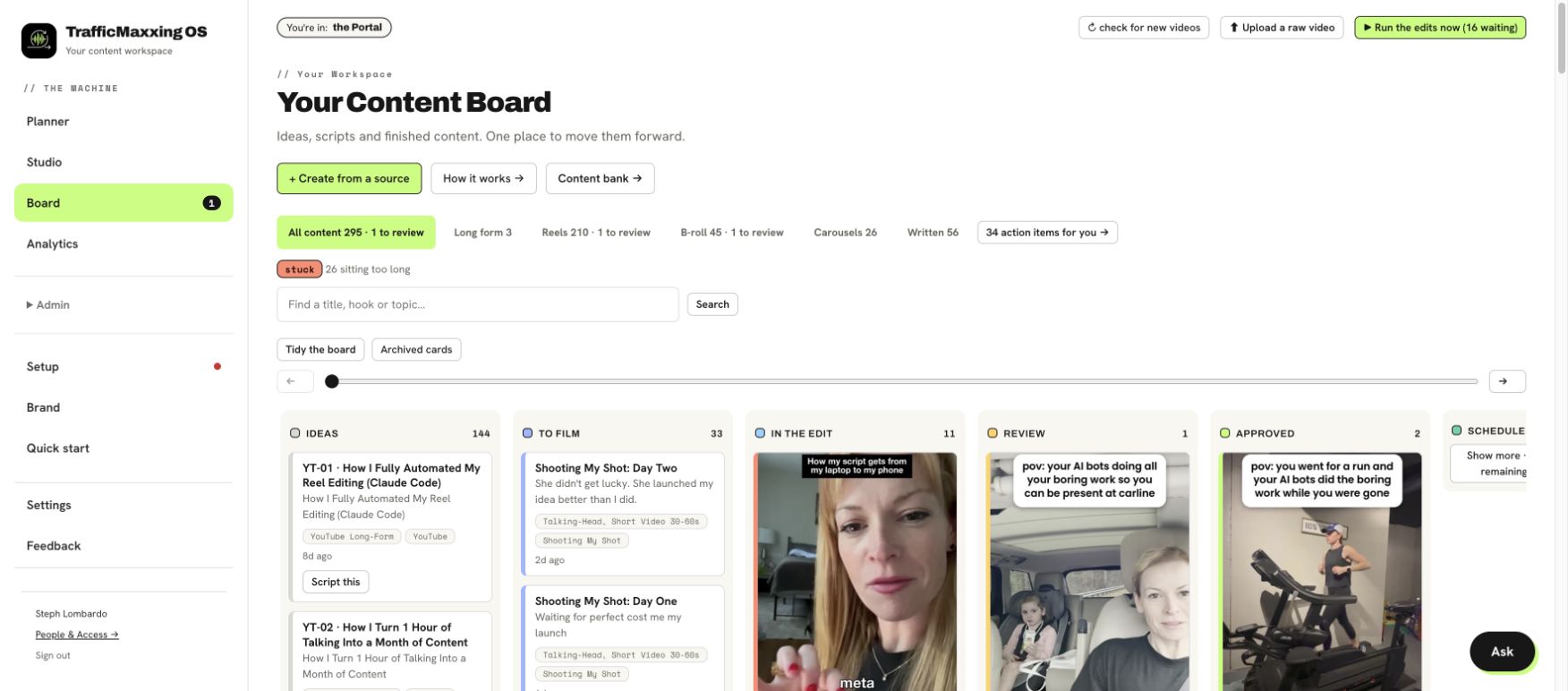
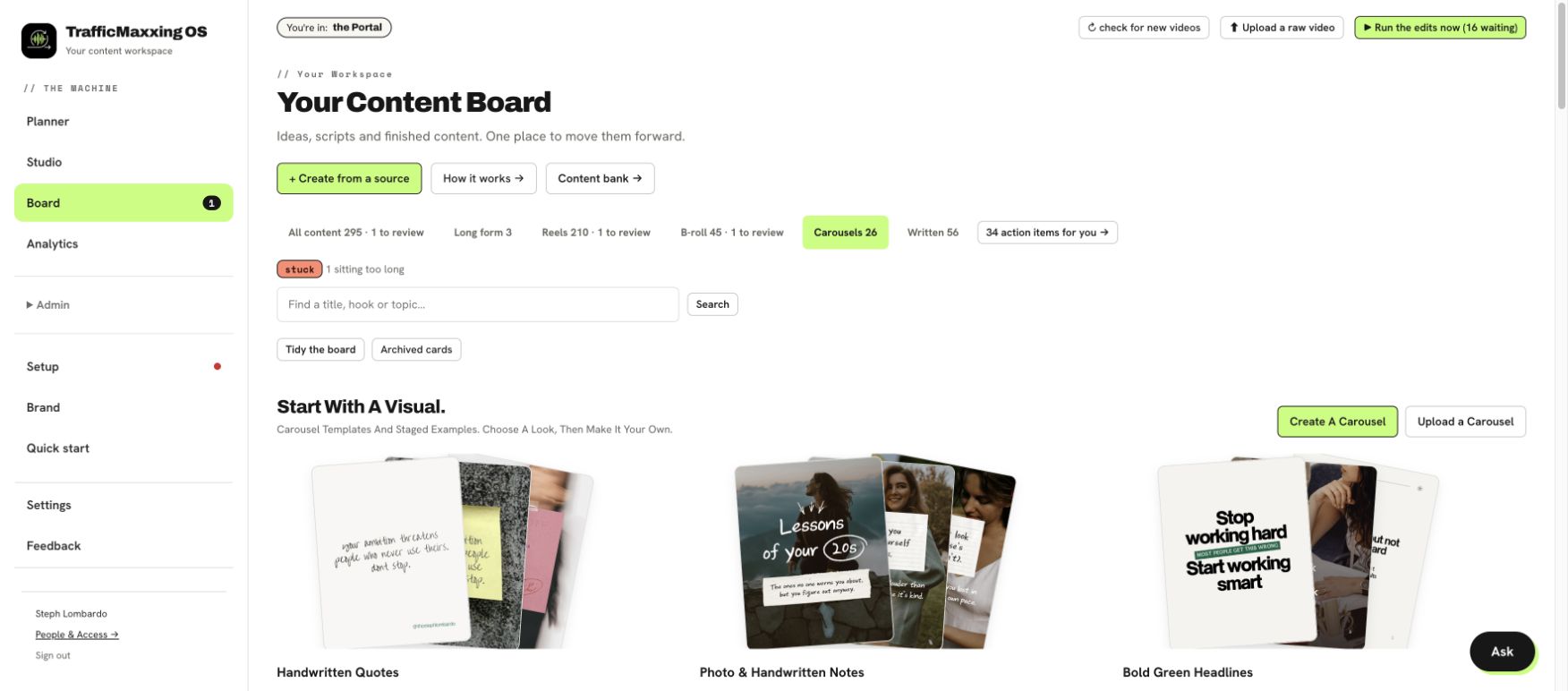
The full video walkthrough is coming here. In the meantime, explore the real screens and editor examples above.
AI roles with a job to do, your brand context to work from, and a place to hand the work over.
Pull useful themes from your sources and saved inspiration.
Turn those themes into ideas grounded in your experience.
Shape the hooks, scripts, and message around your audience.
Work through the footage and create the cut for review.
Check drafts against your instructions before your final review.
Prepare approved content for your chosen publishing workflow.
Your brand voice, saved lessons, examples, and editing preferences stay with the system. Turn useful feedback into saved guidance for future requests.
As you refine that guidance, the machine has more to work from. And if the person helping you changes, your process has a place to stay.
I built the machine because content kept turning into another team to manage. I wanted to spend more time sharing what I know—and less time getting it out the door.
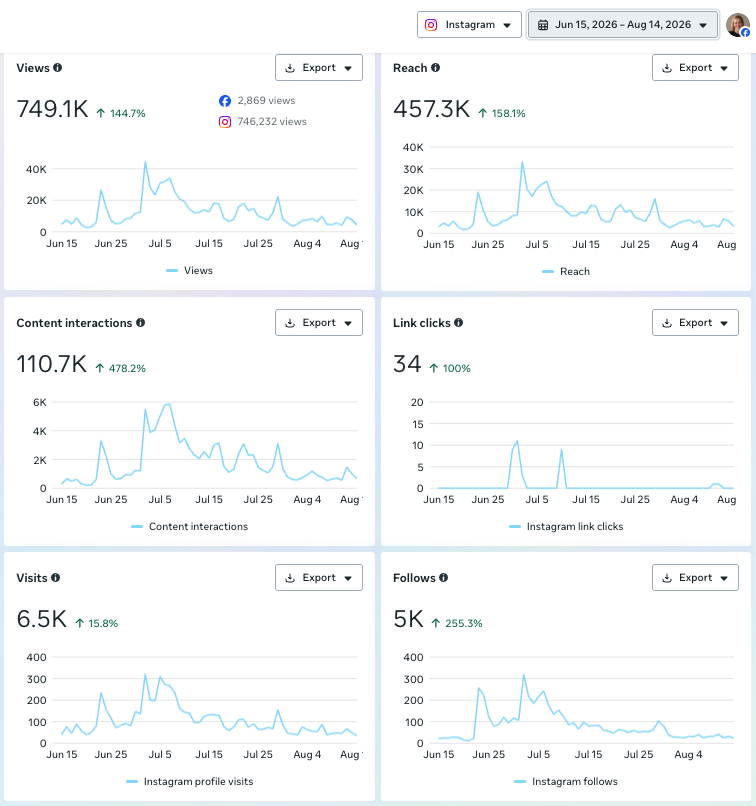
Steph’s account analytics · June 15–August 14, 2026. Historical results from her own content workflow; not customer averages or a guarantee of reach, followers, leads, or sales.
“I’ve been trying to be consistent with content for years and this was an absolute game changer.”
“We literally just drop the raw footage and it pumps out tons of videos ready to post.”
Feedback previously shared on the original machine page, about the content system and editor—not a claim of results from this new SaaS cohort.
For founders with a proven offer, something to say, and a business to run while they say it.
You bring the point of view.
The machine helps you produce it.
One payment for your first 12 months.
Your own paid Claude Code subscription is required and billed separately. Its usage limits apply. Optional publishing services may have separate fees.
Have a question? Book a Call ↗This is a developing product. The newest features roll out across founding workspaces.
This is the full TrafficMaxxing OS: a hosted workspace for brand context, planning, creation, editing, and review. This founding cohort offer is separate from the standalone editor product.
Yes. You connect your own paid Claude Code subscription. It powers the AI work, is billed separately, and has its own usage limits.
You choose the formats and quantities. A substantial call or video can support a bigger batch than a short voice note. There is no fixed “one in, 24 out” guarantee: source quality, length, requested formats, and your review determine what’s useful.
No. Feed the machine original ideas, or use the material already in your calls, transcripts, and weekly work. Connected imports must be set up and enabled. Your context gives the AI something specific to work with.
Yes. Choose the source, the outputs, the style, and the feedback. Or configure more of the intake and production workflow to run with less day-to-day handling. You still provide direction and decide the publishing rules.
Publishing depends on supported formats, connected accounts, and services such as Blotato. You can use supported scheduling or export and publish yourself. Email and community drafts can be copied into your own tools. Creating or editing a draft does not itself publish it.
The screenshots here are from Steph’s real workspace. There isn’t a public trial workspace on this page. Watch the editor examples or book a call for a closer look; a full video walkthrough is on its way.
12 months in the founding cohort · Your own Claude Code subscription required.